The Purchasing module does the following:
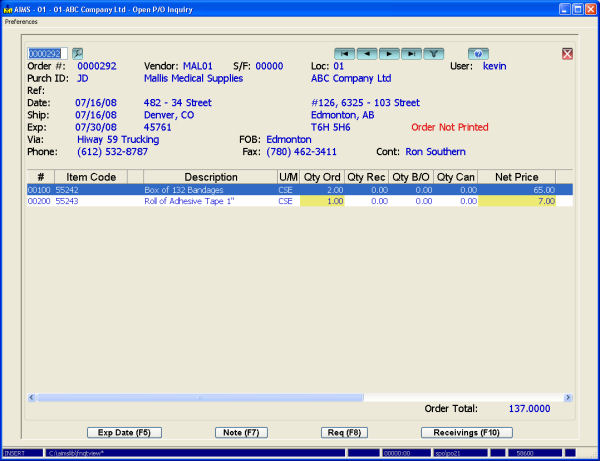
The Purchase Order Entry screen lets you enter and edit purchase orders. You can enter the expected delivery date by order or by individual line item. And you can enter a vendor ‘ship-from’ if the supplier’s warehouse address is different from the ‘pay to’ address in the vendor file. The screen displays individual purchase notes by item (if they exist) and purchase notes by vendor.
You can then print, fax, or email P/Os directly from the system.
Purchase requisitions from Order Entry, Service Order, Rental Billing, Job Costing, and manufacturing work orders can be added to P/Os. Costs are then posted to source modules when P/Os are received.
Received P/Os automatically add landing factors to the vendor price (e.g., duty, brokerage, freight, and exchange) to arrive at landed cost. G/L is updated accordingly and an entry is made to Accrued Payables (which will later be reversed by the A/P invoice).
Purchase returns can be entered and a return packing slip printed. Posted purchase returns then await vendor credit memos.
You can monitor open P/Os through screen inquiries and reports. The Open Management Inquiry provides a snapshot along with ‘drill down’ into the number and value of P/Os by location, purchaser, and vendor. The Open Detail Inquiry lets you scroll through outstanding P/Os by vendor, purchaser, or location, and then lets you update the P/O’s notes and expected delivery dates (either by line item or for the whole P/O). Another inquiry sorts outstanding P/Os by expected delivery date.
The system stores all received P/Os into history. The Purchase Analysis Inquiry is invaluable as it lists each time the item was purchased within a particular date range, along with the vendor and the price paid. Another report shows vendor delivery performance by comparing expected delivery dates to actual.
This module integrates with Inventory, Manufacturing, Job Costing, Service Order, Rental Billing, and General Ledger.