

Customer Support
 Payroll

The Payroll module does the following:

  • Maintains employee related files.
  • Provides an efficient way to enter employee time into the system and disburse time to job costing, work order costing or fixed assets (if applicable).
  • Prints employee cheques or transfers payroll data to the bank for direct deposit.
  • Lets you print record of employment forms and year-end T4s.
  • Provides useful inquiries and management reports.

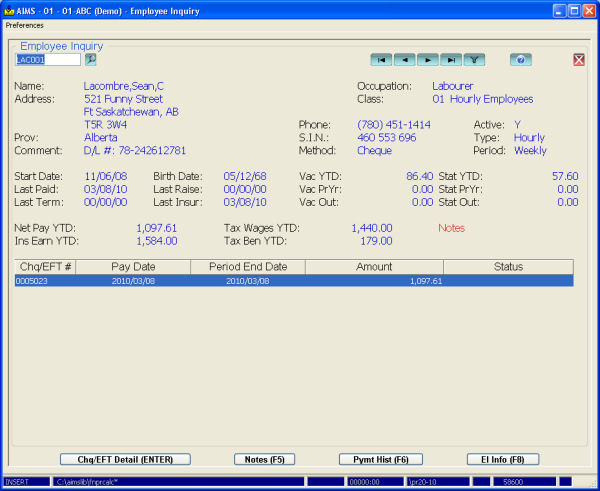
Information stored on each employee includes: name, address, phone number, the province they pay taxes to, whether they are hourly or salary and if they are paid weekly, bi-weekly, monthly or semi-monthly.

The system stores up to 9 pay rates and 18 benefits and deductions per employee. Benefits may be taxable or non-taxable and deductions can be defined as tax reducing. Employees may pay extra tax using the tax boost option and can have their vacation pay taxed when paid or when earned.

You can use employee classes to default pay rates along with benefit and deduction profiles to speed up administration for new employees.

Hours for hourly employees can be disbursed to jobs, manufacturing work orders or against fixed assets. You can also cost fixed asset time to jobs or work orders.

Benefits and deductions can be calculated or entered for each pay run. Calculated benefits and deductions can also be overridden.

The Payroll Processing Listing shows all details of the pay run before cheques are printed. After printing, the system generates a Payroll Cheque List, which gives details about each cheque and totals for the cheque run. Manual cheques are also accommodated.

Two inquiries give all information regarding employees and their pay history.

Union reports can be defined and printed. Other reports include month-to-date and year-to-date labour analyses, an Outstanding Vacation Pay List, an Employee Pay History Report and an Employee YTD Summary Listing.

The system calculates and tracks EI information and prints record of employment forms. It also prints year-end T4s and the Alberta WCB report.

This module integrates with General Ledger, Job Costing, Bill of Material / Work Order and Fixed Assets.
The Payroll module does the following:

  • Maintains employee related files.
  • Provides an efficient way to enter employee time into the system and disburse time to job costing, work order costing or fixed assets (if applicable).
  • Prints employee cheques or transfers payroll data to the bank for direct deposit.
  • Lets you print record of employment forms and year-end T4s.
  • Provides useful inquiries and management reports.

Information stored on each employee includes: name, address, phone number, the province they pay taxes to, whether they are hourly or salary and if they are paid weekly, bi-weekly, monthly or semi-monthly.

The system stores up to 9 pay rates and 18 benefits and deductions per employee. Benefits may be taxable or non-taxable and deductions can be defined as tax reducing. Employees may pay extra tax using the tax boost option and can have their vacation pay taxed when paid or when earned.

You can use employee classes to default pay rates along with benefit and deduction profiles to speed up administration for new employees.

Hours for hourly employees can be disbursed to jobs, manufacturing work orders or against fixed assets. You can also cost fixed asset time to jobs or work orders.

Benefits and deductions can be calculated or entered for each pay run. Calculated benefits and deductions can also be overridden.

The Payroll Processing Listing shows all details of the pay run before cheques are printed. After printing, the system generates a Payroll Cheque List, which gives details about each cheque and totals for the cheque run. Manual cheques are also accommodated.

Two inquiries give all information regarding employees and their pay history.

Union reports can be defined and printed. Other reports include month-to-date and year-to-date labour analyses, an Outstanding Vacation Pay List, an Employee Pay History Report and an Employee YTD Summary Listing.

The system calculates and tracks EI information and prints record of employment forms. It also prints year-end T4s and the Alberta WCB report.

This module integrates with General Ledger, Job Costing, Bill of Material / Work Order and Fixed Assets.

 
 What's New?
AIMS Handheld

AIMS Handheld allows picking, issuing and inventory counting all through handheld devices.

Pick slips are pulled into the handheld, pickers then scan items and enter quantity picked. This information is then transferred back to the AIMS system for packing slip generation. Handhelds can also issue material to service orders or manufacturing workorders and collect physical count information. Currently only Symbol hardware is supported and development is underway to further enhance this module.

 
AIMS E-Commerce Data Transfer

AIMS E-Commerce data transfer passes data between your AIMS system and an E-Commerce shopping site. Data transferred includes inventory items and pricing from the AIMS server to the E-Commerce server and online orders from the E-Commerce server back to AIMS.

You can also pass customer, ship-to, shipping and sales history data from AIMS to the E-Commerce server.

 
AIMS Data Warehousing

AIMS Data Warehousing pushes your AIMS data to a true SQL database on a routine basis (say nightly). From there you can extract using common reporting tools like Crystal Reports, Excel and Access, or write your own program with C#, Visual Basic or any other SQL language.

Your AIMS data can be pushed to either MS SQL Server or the Firebird database and AIMS Data Warehousing includes pre-defined sales analysis and job costing views along with a great pivot writer. 

 
AIMS Handheld

AIMS Handheld allows picking, issuing and inventory counting all through handheld devices.

Pick slips are pulled into the handheld, pickers then scan items and enter quantity picked. This information is then transferred back to the AIMS system for packing slip generation. Handhelds can also issue material to service orders or manufacturing workorders and collect physical count information. Currently only Symbol hardware is supported and development is underway to further enhance this module.

 
AIMS E-Commerce Data Transfer

AIMS E-Commerce data transfer passes data between your AIMS system and an E-Commerce shopping site. Data transferred includes inventory items and pricing from the AIMS server to the E-Commerce server and online orders from the E-Commerce server back to AIMS.

You can also pass customer, ship-to, shipping and sales history data from AIMS to the E-Commerce server.

 
AIMS Data Warehousing

AIMS Data Warehousing pushes your AIMS data to a true SQL database on a routine basis (say nightly). From there you can extract using common reporting tools like Crystal Reports, Excel and Access, or write your own program with C#, Visual Basic or any other SQL language.

Your AIMS data can be pushed to either MS SQL Server or the Firebird database and AIMS Data Warehousing includes pre-defined sales analysis and job costing views along with a great pivot writer. 


  Whytespace
  Powered by
www.whytespace.ca