

Customer Support
 General Ledger

The General Ledger module does the following:

  • Provides an easy way to maintain chart of accounts and budget files.
  • Lets you efficiently create and post journal entries and create recurring, allocation and currency revaluation journal entries.
  • Prints financial statements for any period within the current, next or previous two years.
  • Gives you excellent access to current or historical transaction details.
  • Accommodates multi-company consolidations and unique statement formatting.

Account numbers can be any combination of accounts, departments and cost centres up to sixteen digits. The system stores monthly closing balances for each account for the current and prior two years and stores the following budget figures: current year original, current year revised, last year’s and next year’s.

Journal entry processing lets you create, change, delete or post a batch of entries. You can:

  • Create a batch for a future period.
  • Flag a batch as auto-reversing. This means when you post the batch, the system creates a new batch with reversing entries and dates it for the first day of the next period.
  • Create an allocation table for any account. Later, when you create allocation journal entries, the system reads the table and creates all allocation entries within one batch.
  • Post recurring journal entries, which are maintained in a file.
  • Create currency revaluation entries if using multiple currencies.

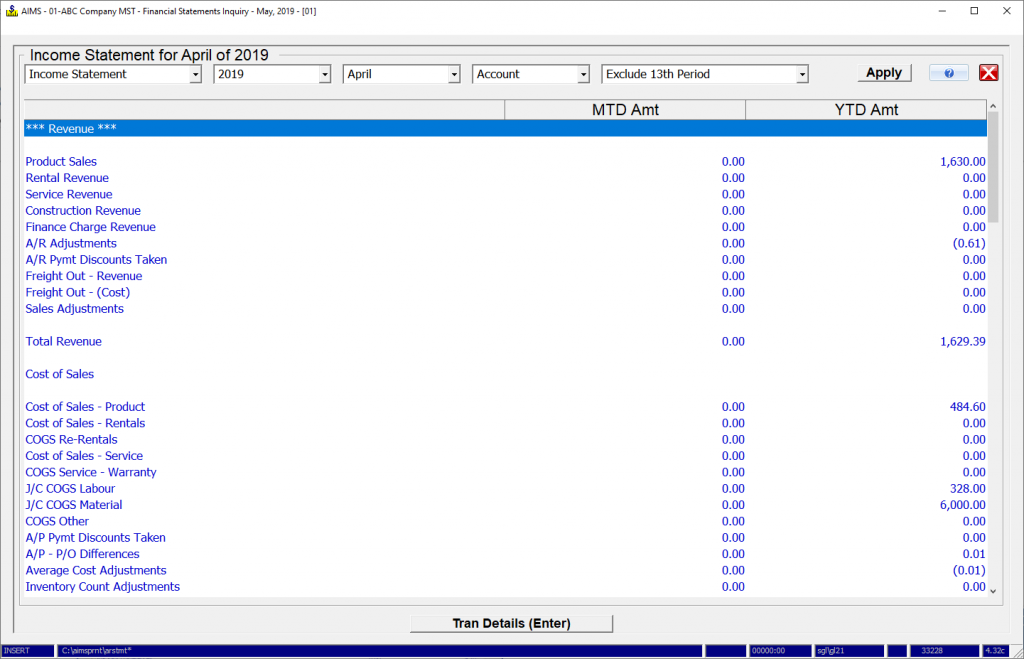
An Account Transactions inquiry lets you ‘drill down’ to the related batch (including source posting detail). The Financial Statements Inquiry displays financial statement information for prior, current and future months, and also lets you ‘drill down’ to the batch level. The Account Inquiry shows balances for the current and the last two years.

You can generate income statements by company, by department or by cost centre, and can compare actual figures to budget or prior year amounts. A 12-month income statement shows figures for all 12 months on one page and forecasts year-end profit or loss.

A flexible Statement Formatter lets you create your own financial statements and schedules by defining each line on the statement.

The multiple-company consolidation feature lets you make inter-company journal entries before you print consolidated statements. You can also create consolidated statements through the Statement Formatter.

The General Ledger module integrates with all other AIMS modules.
The General Ledger module does the following:

  • Provides an easy way to maintain chart of accounts and budget files.
  • Lets you efficiently create and post journal entries and create recurring, allocation and currency revaluation journal entries.
  • Prints financial statements for any period within the current, next or previous two years.
  • Gives you excellent access to current or historical transaction details.
  • Accommodates multi-company consolidations and unique statement formatting.

Account numbers can be any combination of accounts, departments and cost centres up to sixteen digits. The system stores monthly closing balances for each account for the current and prior two years and stores the following budget figures: current year original, current year revised, last year’s and next year’s.

Journal entry processing lets you create, change, delete or post a batch of entries. You can:

  • Create a batch for a future period.
  • Flag a batch as auto-reversing. This means when you post the batch, the system creates a new batch with reversing entries and dates it for the first day of the next period.
  • Create an allocation table for any account. Later, when you create allocation journal entries, the system reads the table and creates all allocation entries within one batch.
  • Post recurring journal entries, which are maintained in a file.
  • Create currency revaluation entries if using multiple currencies.

An Account Transactions inquiry lets you ‘drill down’ to the related batch (including source posting detail). The Financial Statements Inquiry displays financial statement information for prior, current and future months, and also lets you ‘drill down’ to the batch level. The Account Inquiry shows balances for the current and the last two years.

You can generate income statements by company, by department or by cost centre, and can compare actual figures to budget or prior year amounts. A 12-month income statement shows figures for all 12 months on one page and forecasts year-end profit or loss.

A flexible Statement Formatter lets you create your own financial statements and schedules by defining each line on the statement.

The multiple-company consolidation feature lets you make inter-company journal entries before you print consolidated statements. You can also create consolidated statements through the Statement Formatter.

The General Ledger module integrates with all other AIMS modules.

 
 What's New?
AIMS Handheld

AIMS Handheld allows picking, issuing and inventory counting all through handheld devices.

Pick slips are pulled into the handheld, pickers then scan items and enter quantity picked. This information is then transferred back to the AIMS system for packing slip generation. Handhelds can also issue material to service orders or manufacturing workorders and collect physical count information. Currently only Symbol hardware is supported and development is underway to further enhance this module.

 
AIMS E-Commerce Data Transfer

AIMS E-Commerce data transfer passes data between your AIMS system and an E-Commerce shopping site. Data transferred includes inventory items and pricing from the AIMS server to the E-Commerce server and online orders from the E-Commerce server back to AIMS.

You can also pass customer, ship-to, shipping and sales history data from AIMS to the E-Commerce server.

 
AIMS Data Warehousing

AIMS Data Warehousing pushes your AIMS data to a true SQL database on a routine basis (say nightly). From there you can extract using common reporting tools like Crystal Reports, Excel and Access, or write your own program with C#, Visual Basic or any other SQL language.

Your AIMS data can be pushed to either MS SQL Server or the Firebird database and AIMS Data Warehousing includes pre-defined sales analysis and job costing views along with a great pivot writer. 

 
AIMS Handheld

AIMS Handheld allows picking, issuing and inventory counting all through handheld devices.

Pick slips are pulled into the handheld, pickers then scan items and enter quantity picked. This information is then transferred back to the AIMS system for packing slip generation. Handhelds can also issue material to service orders or manufacturing workorders and collect physical count information. Currently only Symbol hardware is supported and development is underway to further enhance this module.

 
AIMS E-Commerce Data Transfer

AIMS E-Commerce data transfer passes data between your AIMS system and an E-Commerce shopping site. Data transferred includes inventory items and pricing from the AIMS server to the E-Commerce server and online orders from the E-Commerce server back to AIMS.

You can also pass customer, ship-to, shipping and sales history data from AIMS to the E-Commerce server.

 
AIMS Data Warehousing

AIMS Data Warehousing pushes your AIMS data to a true SQL database on a routine basis (say nightly). From there you can extract using common reporting tools like Crystal Reports, Excel and Access, or write your own program with C#, Visual Basic or any other SQL language.

Your AIMS data can be pushed to either MS SQL Server or the Firebird database and AIMS Data Warehousing includes pre-defined sales analysis and job costing views along with a great pivot writer. 


  Whytespace
  Powered by
www.whytespace.ca