
Customer Support
 Fixed Assets

The Fixed Assets module does the following:

  • Maintains equipment/asset related files.
  • Automatically generates monthly depreciation entries.
  • Facilitates posting cost and revenue transactions against assets.
  • Accommodates posting asset charge transactions against work orders and jobs.
  • Acts as an item file for Rental Billing.
  • Provides useful inquiries and management reports.

The asset master file stores useful information such as unit number, make, model, year, serial number, purchase date, original hours, original mileage, original cost, estimated life, value of capital improvements, net book value, replacement and salvage value along with disposal date and amount.

This module automatically generates depreciation charges against each asset and makes the appropriate journal entries.

You can track material, inside labour, outside labour, interest and depreciation costs as well as repair time against each asset.

The system facilitates charging equipment against jobs and work orders. It tracks the quantity of units charged and internal revenue accrued, month by month, for this year, last year and since new.

If used with AIMS Rental Billing, this module maintains pricing for each asset by unit of measure (e.g. hour, day, week, month) and tracks units billed and revenue earned by asset, month by month, for this year, last year and since new.

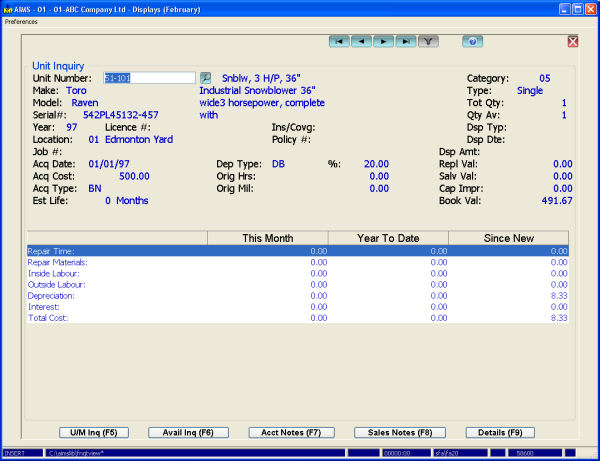
One inquiry shows the master file information maintained for each asset along with a summary of repair time, material costs, inside labour costs, outside labour costs, depreciation and interest. Another shows the details for every transaction posted to or from each piece of equipment. The third inquiry shows the revenue associated with a piece of equipment.

The system comes with seven standard reports, including an Asset Valuation Report, which lists acquisitions, disposals, depreciation and net book value for any given period, by asset or tax class, and a Year to date Profit / Loss Report, which shows revenue (internal and/or external) and costs by asset for the month, year and since new.

This module integrates with Payroll, Accounts Payable, General Ledger, Job Costing and Bill of Materials / Work Order and is required by Rental Billing.
The Fixed Assets module does the following:

  • Maintains equipment/asset related files.
  • Automatically generates monthly depreciation entries.
  • Facilitates posting cost and revenue transactions against assets.
  • Accommodates posting asset charge transactions against work orders and jobs.
  • Acts as an item file for Rental Billing.
  • Provides useful inquiries and management reports.

The asset master file stores useful information such as unit number, make, model, year, serial number, purchase date, original hours, original mileage, original cost, estimated life, value of capital improvements, net book value, replacement and salvage value along with disposal date and amount.

This module automatically generates depreciation charges against each asset and makes the appropriate journal entries.

You can track material, inside labour, outside labour, interest and depreciation costs as well as repair time against each asset.

The system facilitates charging equipment against jobs and work orders. It tracks the quantity of units charged and internal revenue accrued, month by month, for this year, last year and since new.

If used with AIMS Rental Billing, this module maintains pricing for each asset by unit of measure (e.g. hour, day, week, month) and tracks units billed and revenue earned by asset, month by month, for this year, last year and since new.

One inquiry shows the master file information maintained for each asset along with a summary of repair time, material costs, inside labour costs, outside labour costs, depreciation and interest. Another shows the details for every transaction posted to or from each piece of equipment. The third inquiry shows the revenue associated with a piece of equipment.

The system comes with seven standard reports, including an Asset Valuation Report, which lists acquisitions, disposals, depreciation and net book value for any given period, by asset or tax class, and a Year to date Profit / Loss Report, which shows revenue (internal and/or external) and costs by asset for the month, year and since new.

This module integrates with Payroll, Accounts Payable, General Ledger, Job Costing and Bill of Materials / Work Order and is required by Rental Billing.

 
 What's New?
AIMS Handheld

AIMS Handheld allows picking, issuing and inventory counting all through handheld devices.

Pick slips are pulled into the handheld, pickers then scan items and enter quantity picked. This information is then transferred back to the AIMS system for packing slip generation. Handhelds can also issue material to service orders or manufacturing workorders and collect physical count information. Currently only Symbol hardware is supported and development is underway to further enhance this module.

 
AIMS E-Commerce Data Transfer

AIMS E-Commerce data transfer passes data between your AIMS system and an E-Commerce shopping site. Data transferred includes inventory items and pricing from the AIMS server to the E-Commerce server and online orders from the E-Commerce server back to AIMS.

You can also pass customer, ship-to, shipping and sales history data from AIMS to the E-Commerce server.

 
AIMS Data Warehousing

AIMS Data Warehousing pushes your AIMS data to a true SQL database on a routine basis (say nightly). From there you can extract using common reporting tools like Crystal Reports, Excel and Access, or write your own program with C#, Visual Basic or any other SQL language.

Your AIMS data can be pushed to either MS SQL Server or the Firebird database and AIMS Data Warehousing includes pre-defined sales analysis and job costing views along with a great pivot writer. 

 
AIMS Handheld

AIMS Handheld allows picking, issuing and inventory counting all through handheld devices.

Pick slips are pulled into the handheld, pickers then scan items and enter quantity picked. This information is then transferred back to the AIMS system for packing slip generation. Handhelds can also issue material to service orders or manufacturing workorders and collect physical count information. Currently only Symbol hardware is supported and development is underway to further enhance this module.

 
AIMS E-Commerce Data Transfer

AIMS E-Commerce data transfer passes data between your AIMS system and an E-Commerce shopping site. Data transferred includes inventory items and pricing from the AIMS server to the E-Commerce server and online orders from the E-Commerce server back to AIMS.

You can also pass customer, ship-to, shipping and sales history data from AIMS to the E-Commerce server.

 
AIMS Data Warehousing

AIMS Data Warehousing pushes your AIMS data to a true SQL database on a routine basis (say nightly). From there you can extract using common reporting tools like Crystal Reports, Excel and Access, or write your own program with C#, Visual Basic or any other SQL language.

Your AIMS data can be pushed to either MS SQL Server or the Firebird database and AIMS Data Warehousing includes pre-defined sales analysis and job costing views along with a great pivot writer. 


  Whytespace
  Powered by
www.whytespace.ca