

Customer Support
 Rental Billing

The Rental Billing module does the following:

  • Lets you create rental quotes and transfer open quotes to rental orders.
  • Makes rental orders to print pick/pack slips for warehouse staff to ship from.
  • Creates rental contracts either from rental orders or directly.
  • Handles rental returns and prints customer return slips.
  • Invoices outstanding contracts automatically or manually.
  • Maintains rental history information.

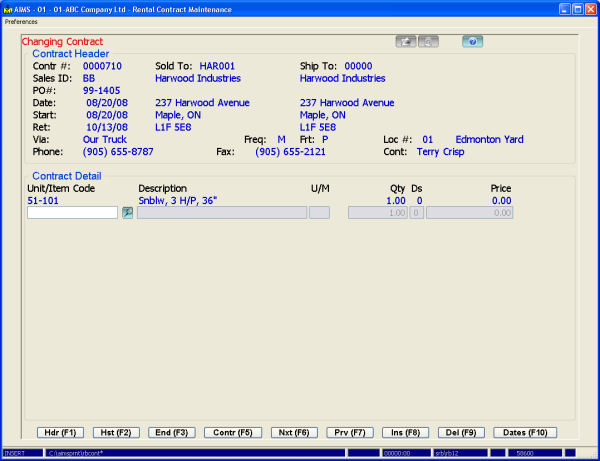
Rental entry lets you enter contract information such as: contract date, start and expected return dates, and billing frequency (either weekly, monthly or on demand). It displays rental sales notes by asset (if they exist) and retrieves previously entered pricing information.

Inventory items can be sold on a rental contract – they will then be removed during the first contract billing. All new contracts are subject to a credit check before printing.

The system assigns pricing based on the customer's price level and the corresponding price specified for each asset. You can also apply quantity breaks and percentage discounts to the selling price.

You can automatically bill contracts on a weekly or monthly basis using the contract start and return dates.

You can monitor outstanding contracts through a number of screen inquiries and reports. The Open Management Inquiry provides a drill down snapshot into the number of open contracts by location, salesperson and customer. The Open Detail Inquiry lets you scroll through outstanding contracts by customer, salesperson or location and then lets you update contract notes and expected return dates (either by line item or for the whole contract). Another inquiry sorts all outstanding contracts by expected return date.

The system stores details of all rental invoices in history. The Invoice History Inquiry lets you scroll through previous rental invoices by contract or by invoice number for a particular customer. This is valuable if you want to provide customers with the same unit they had the last time.

Reports list open contract information as well as sales history. The Rental Contract Summary Report summarizes all billing against a contract by asset and item, which provides an excellent check before closing any contract.

The rental quotation system lets you track open quotes, transfer quotes to orders or to lost history and then report on lost history by reason code.

This module integrates with Fixed Assets, Accounts Receivable and General Ledger.
The Rental Billing module does the following:

  • Lets you create rental quotes and transfer open quotes to rental orders.
  • Makes rental orders to print pick/pack slips for warehouse staff to ship from.
  • Creates rental contracts either from rental orders or directly.
  • Handles rental returns and prints customer return slips.
  • Invoices outstanding contracts automatically or manually.
  • Maintains rental history information.

Rental entry lets you enter contract information such as: contract date, start and expected return dates, and billing frequency (either weekly, monthly or on demand). It displays rental sales notes by asset (if they exist) and retrieves previously entered pricing information.

Inventory items can be sold on a rental contract – they will then be removed during the first contract billing. All new contracts are subject to a credit check before printing.

The system assigns pricing based on the customer's price level and the corresponding price specified for each asset. You can also apply quantity breaks and percentage discounts to the selling price.

You can automatically bill contracts on a weekly or monthly basis using the contract start and return dates.

You can monitor outstanding contracts through a number of screen inquiries and reports. The Open Management Inquiry provides a drill down snapshot into the number of open contracts by location, salesperson and customer. The Open Detail Inquiry lets you scroll through outstanding contracts by customer, salesperson or location and then lets you update contract notes and expected return dates (either by line item or for the whole contract). Another inquiry sorts all outstanding contracts by expected return date.

The system stores details of all rental invoices in history. The Invoice History Inquiry lets you scroll through previous rental invoices by contract or by invoice number for a particular customer. This is valuable if you want to provide customers with the same unit they had the last time.

Reports list open contract information as well as sales history. The Rental Contract Summary Report summarizes all billing against a contract by asset and item, which provides an excellent check before closing any contract.

The rental quotation system lets you track open quotes, transfer quotes to orders or to lost history and then report on lost history by reason code.

This module integrates with Fixed Assets, Accounts Receivable and General Ledger.

 
 What's New?
AIMS Handheld

AIMS Handheld allows picking, issuing and inventory counting all through handheld devices.

Pick slips are pulled into the handheld, pickers then scan items and enter quantity picked. This information is then transferred back to the AIMS system for packing slip generation. Handhelds can also issue material to service orders or manufacturing workorders and collect physical count information. Currently only Symbol hardware is supported and development is underway to further enhance this module.

 
AIMS E-Commerce Data Transfer

AIMS E-Commerce data transfer passes data between your AIMS system and an E-Commerce shopping site. Data transferred includes inventory items and pricing from the AIMS server to the E-Commerce server and online orders from the E-Commerce server back to AIMS.

You can also pass customer, ship-to, shipping and sales history data from AIMS to the E-Commerce server.

 
AIMS Data Warehousing

AIMS Data Warehousing pushes your AIMS data to a true SQL database on a routine basis (say nightly). From there you can extract using common reporting tools like Crystal Reports, Excel and Access, or write your own program with C#, Visual Basic or any other SQL language.

Your AIMS data can be pushed to either MS SQL Server or the Firebird database and AIMS Data Warehousing includes pre-defined sales analysis and job costing views along with a great pivot writer. 

 
AIMS Handheld

AIMS Handheld allows picking, issuing and inventory counting all through handheld devices.

Pick slips are pulled into the handheld, pickers then scan items and enter quantity picked. This information is then transferred back to the AIMS system for packing slip generation. Handhelds can also issue material to service orders or manufacturing workorders and collect physical count information. Currently only Symbol hardware is supported and development is underway to further enhance this module.

 
AIMS E-Commerce Data Transfer

AIMS E-Commerce data transfer passes data between your AIMS system and an E-Commerce shopping site. Data transferred includes inventory items and pricing from the AIMS server to the E-Commerce server and online orders from the E-Commerce server back to AIMS.

You can also pass customer, ship-to, shipping and sales history data from AIMS to the E-Commerce server.

 
AIMS Data Warehousing

AIMS Data Warehousing pushes your AIMS data to a true SQL database on a routine basis (say nightly). From there you can extract using common reporting tools like Crystal Reports, Excel and Access, or write your own program with C#, Visual Basic or any other SQL language.

Your AIMS data can be pushed to either MS SQL Server or the Firebird database and AIMS Data Warehousing includes pre-defined sales analysis and job costing views along with a great pivot writer. 


  Whytespace
  Powered by
www.whytespace.ca